Optional Web Portal
FABLE Pyculator includes an optional local web portal for analysts who want to prepare a workbook version, run named FABLE scenarios, read headline indicators and output tables, compare saved runs, and inspect compact validation evidence without leaving the browser.
The portal is deliberately a presentation layer over the existing notebook APIs. It reads the same
generated model and artifacts the notebook workflow uses, runs the same
fable_pyculator.notebook.run_notebook_loop() path, and never recomputes a FABLE result in
JavaScript.
Install and run
Install the optional web extra and start the service from the repository root:
python -m pip install -e '.[web]'
fable-pyculator web --root . --port 8766
The default bind is 127.0.0.1. A non-loopback bind needs an explicit remote-bind opt-in because
the first release has no authentication:
fable-pyculator web --root . --host 0.0.0.0 --allow-remote
Use --root-path /user/me/proxy/8766 when the service is published under a notebook proxy prefix.
The SPA uses relative asset and API URLs, so one build works at / and under a prefix.
Artifact prerequisites
A version is preparable when both of these exist:
tmp/private-workbooks/<version>_Open_FABLECalculator.xlsx
tmp/generated-models/fable-<version>/generated_fable_<version>_model.py
The default headline curation is version-tolerant. The 2020 and 2021 workbooks expose FOOD, LAND,
GHG, and WATER headline series; the 2024 Canada workbook has no TotalResultsWF water-footprint
table, so its portal preparation succeeds with FOOD, LAND, and GHG headline series. The 2024
LAND[TOTAL] formula is also broken with #REF! in the workbook itself; the portal shows a
clearly labelled Total land area (component sum) series that reproduces the workbook’s valid
calc_land_cor[TotallandFin] total and records the broken source formula in the series
description. Missing tables are skipped rather than reported as a failed preparation.
The GHG headline is built from declared OUTPUT-8 components rather than the TotalCO2e CALC cell. This makes it numeric for 2020, 2021, and 2024. Values are generated-model outputs, so they can differ from workbook-cached totals where an individual component model differs. The 2024 series explicitly excludes LandSeqAffor because that column is not a declared OUTPUT-8 cell in the current artifact.
The workflow artifact may instead be present as the approved compressed archive:
examples/fable_<version>/generated_fable_<version>_model.py.xz
The portal materializes that archive into the ignored working path before loading it. A clean checkout can therefore browse artifacts and validation evidence, but the workbench remains disabled with the missing file named explicitly until the source workbook is restored.
Preparation and execution are background jobs because real workbooks and generated models are large.
On a warm checkout, the 2021 workbook spec takes roughly two minutes to discover and a scenario run
takes roughly one minute. Prepared specs are cached under runtime/portal/specs/, saved runs
under runtime/portal/runs/, persistent chats under runtime/portal/chats/, and the assistant
grounding sheet under runtime/portal/assistant/. These directories are ignored by Git.
Pages
- Overview
Readiness cards for each configured workbook version and recent saved runs.
- Workbench
Prepare a version, choose one option per selection control, optionally choose output tables and an output-column flavour filter, and run the generated model.
- Results
KPI cards derived from the declared headline series, one chart per headline series, and every rendered output table with client-side CSV export. Each saved run also records provenance: portal version, workbook and generated-model paths/sizes, prepared timestamp, and workbook id.
- Compare
Align two or more saved runs by year and show selection and latest-value differences.
- Optimization
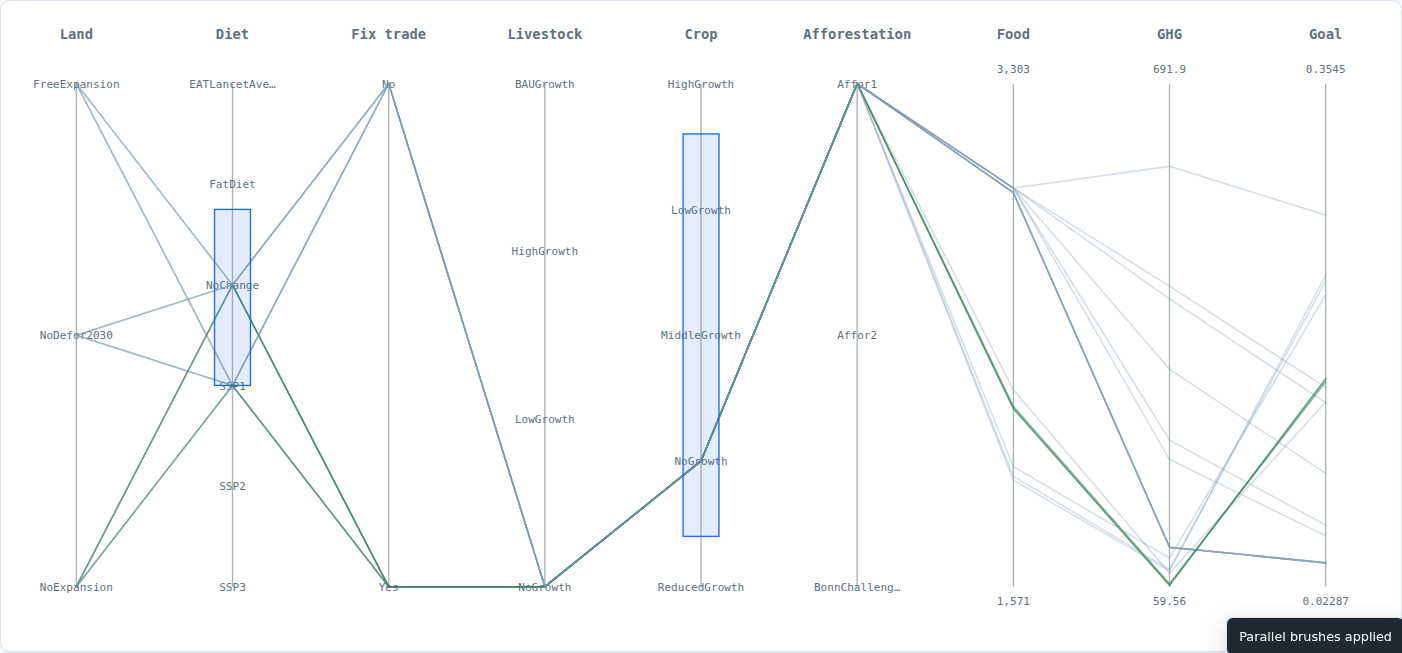
Explore the tracked exact Pareto frontier for the optimization pilot. The page maps food, GHG, land, and the weighted-goal score to X/Y/Z, supports colour, size, quality-floor filtering, an exact-front-only toggle, a provisional-warning filter, hover values, selected-point highlighting, and actual axis ranges. It also lets you inspect, pin, compare, and load a frontier point into the Workbench. A synchronized parallel-coordinates panel shows the same filtered exact points across land, diet, trade-fix, livestock, crop, afforestation, food, GHG, and goal axes; clicking a line selects the matching 3D point. Dragging vertically on an axis brushes a range and filters both views; Shift-drag adds another axis brush, each brush has a removable chip, and Clear brushes resets them. A point can be set as a reference, with an exact selected-vs-reference delta card and synchronized reference markers. Complete viewer states can be saved as named local presets and recalled from the Saved views panel; the library can also be exported to and imported from JSON, and Copy preset link embeds the named preset and full viewer state in a portable URL. A server-backed Shared library persists named views under the portal runtime directory for everyone with portal access. Shared presets can carry a self-declared author, note, and draft/reviewed status; these are labels, not authenticated approval. The shared panel filters by all / needs review / reviewed, shows draft and reviewed counts, and can mark a selected draft as reviewed. Each shared preset keeps a compact self-declared history of created/updated/reviewed events. A read-only audit table shows all shared presets with author, status, latest event, and history count; a compact activity timeline aggregates recent events with author/action/preset/date filters and a Recently reviewed shortcut; a per-author workload table summarizes created/updated/ reviewed counts and links author rows to the timeline filter. Timeline filter combinations can be saved as named local views, copied as a URL, exported/imported as JSON, or saved to a server-backed shared timeline library; shared timeline views can carry a self-declared author, note, and draft/reviewed status. Audit maintenance can preview or prune history older than a configurable day window while always keeping each preset’s latest event; Prune history first runs the preview and requires a second Confirm prune click. Startup retention can be configured with –history-retention-days, –history-retention-dry-run, and –history-retention-interval-minutes; results are written to runtime/portal/retention-log.jsonl, and a compact dashboard shows recent runs with source, mode, and counts; selecting a run shows per-preset before/after history vectors and removed events, and Export diff CSV downloads the selected run’s vectors. Export runs CSV downloads the recent maintenance log table. Export audit / Export audit CSV download the shared library or event-level CSV. Backup library JSON downloads shared presets, histories, and timeline views; Restore library previews merge or replace counts and requires Confirm restore before writing. Snapshot now writes an immutable snapshot under runtime/portal/library-snapshots/; scheduled snapshots use –library-snapshot-interval-minutes, and –library-snapshot-keep bounds the newest retained files. The panel reports the scheduling interval, retained-newest count, and stored count. The snapshot table shows time, source, preset/view counts, size, and exposes Diff, Download, Restore, and two-step Delete / Confirm delete; snapshot restore uses the same preview/confirm flow, and Diff reports added/replaced/removed/kept entries, changed metadata/state/filter keys, and bounded history additions/removals without writing; Export diff JSON and Export diff CSV download that exact comparison. The current axes, colour, size, filters, brushes, selected point, and reference are encoded in the URL; Copy view link shares that exact state, and Download filtered CSV exports the visible exact points. The viewer reads
examples/optimization/fable_2024/frontier.jsonthrough/api/optimization/frontiers; it never runs an optimizer or a surrogate in the browser.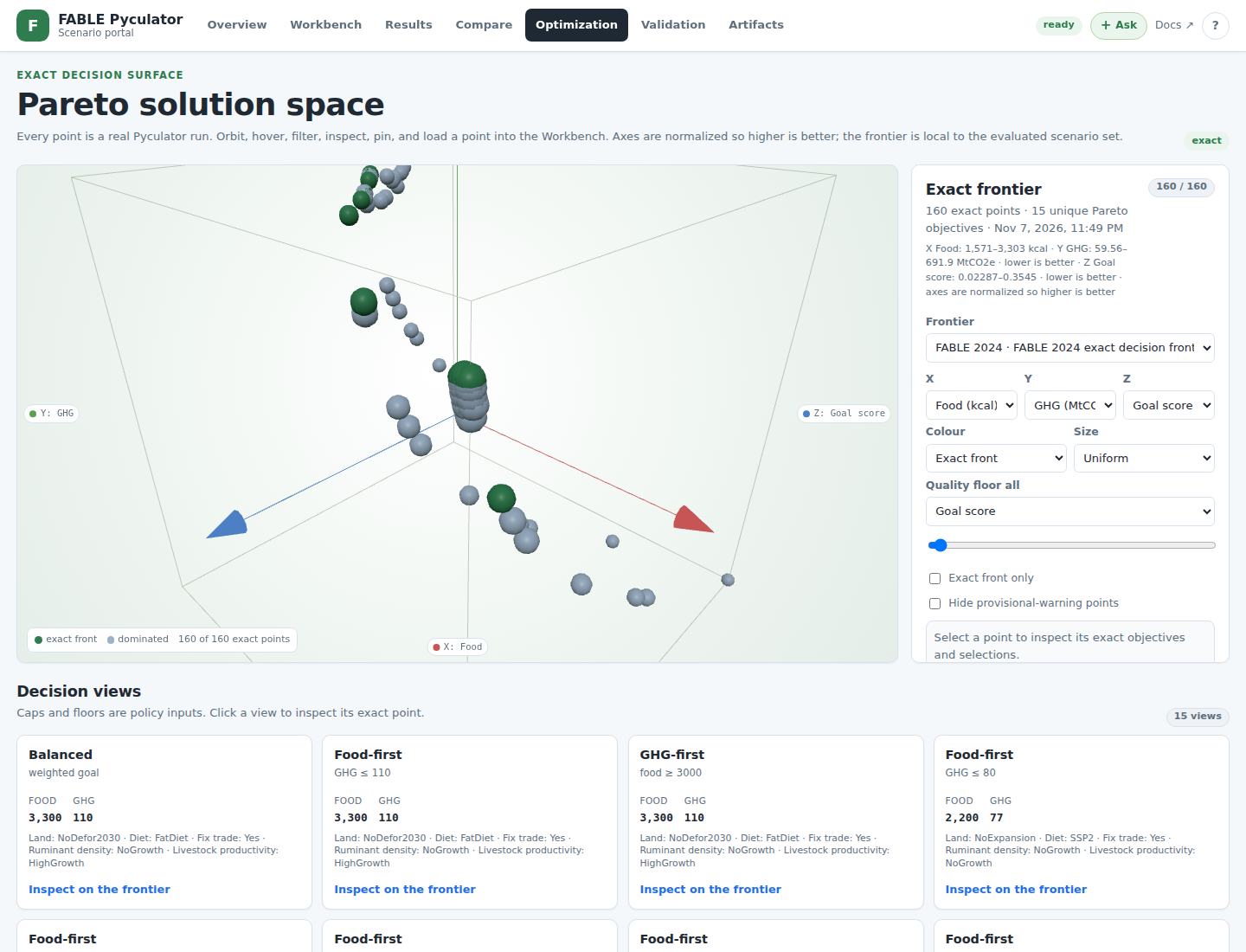
- Validation
Read the compact evidence summary at
tmp/validation-evidence/fable-<version>/summary.json. The portal deliberately does not load the multi-gigabyte inference, expression, generation, or evaluation stage artifacts.- Artifacts
A file-by-file readiness table with paths and sizes, model materialization, and tracked scenario-bundle examples. For 2021 and 2024, the page shows whether the working model matches the tracked uncompressed checksum. A mismatch offers a re-materialize action; preparation also detects and repairs a stale model from the approved archive.
- Assistant
Enabled only when the service is started with
--allow-agent. A green + Ask pill in the header opens a fixed overlay. The overlay keeps a local OpenCode session across turns, renders markdown for both the user and the assistant (including code blocks, lists, links, and tables), shows tool-action chips, and supportsEnterto send withShift+Enterfor multiline prompts. Chats are persisted underruntime/portal/chats/and listed in the overlay, so users can resume a conversation after a reload or service restart. Chats can be renamed, searched, pinned, archived, deleted, and exported as Markdown; short/generic first prompts are replaced by an automatic title derived from the first meaningful assistant line. On the first turn of a new chat, the assistant is required to read the generated grounding sheet atruntime/portal/assistant/cheat-sheet.mdand the FABLE/Modelwright documentation and source paths it lists before answering. The sheet is compiled from every listed doc, contains a documentation digest plus an AST-generated source API index, and is also available atGET /api/assistant/cheatsheet.md. The agent must open the full cited file when a question needs exact signatures, behaviour, examples, or caveats. The bridge invokes the installedopencodeCLI in the repository root and passes compact portal context. The service never reads provider keys. For issue-filing requests, the assistant follows GitHub issue workflow: it asks for missing type, scope, scale, and verification details, drafts the canonical phase/task body, validates it withscripts/check_issue_body.py, shows the draft for confirmation, and posts it withgh issue create --body-file.
Service surface
The service is intentionally small and readable:
Endpoint |
Purpose |
|---|---|
|
Service version, configured versions, prepared state, assistant state. |
|
Portal title, runtime directory, versions, docs URL. |
|
Assistant enablement, executable availability, model, working directory, and timeout. |
|
Readiness summaries for every configured version. |
|
One artifact summary plus compact validation state. |
|
Compact validation evidence or an explicit unavailable message. |
|
In-memory preparation status. |
|
Start the materialize/discover/load job. |
|
Decompress the approved model archive synchronously. |
|
Compact control, table, and headline metadata after preparation. |
|
Poll a preparation or run job. |
|
List saved runs or start a scenario run. |
|
Saved run summary and headline frames. |
|
One saved rendered table. |
|
Align saved runs by headline series and selection values. |
|
List persistent assistant chats or create one. |
|
Load or delete one persistent chat. |
|
The generated grounding sheet and required-reading list. |
|
Tracked scenario-bundle examples. |
|
Optional local assistant turn; returns |
Design lineage
The portal reuses patterns proven in adjacent UBC FRESH projects:
FHOPS and WS4: FastAPI behind an optional extra, a vanilla ES-module SPA, a loopback-only default, an explicit remote-bind guard, and a reader service that calls existing computation rather than embedding a second model.
Fresh Urban Forest Lab: a multi-page decision-support shell with KPI cards, scenario state, explicit artifact readiness, and an optional local assistant.
fresh-fvsbc: provenance-oriented run records. Every saved portal run keeps the portal version, workbook and generated-model paths/sizes, prepared timestamp, and workbook id beside the outputs.
HectaresBC: dependency-free workspace tabs, accessible empty states, and progressive detail panels instead of a build toolchain.
FABLE Pyculator itself: the typed spec, selection controls, output-table renderer, headline frames, scenario bundles, and validation-evidence vocabulary remain the source of truth.
2070 trend extension
The native FABLE workbooks and generated models end at 2050. The portal optionally extends a run to 2070 using a linear trend fitted over the 2035-2050 values for each numeric series.
The 2070 option extrapolates 2055, 2060, 2065, and 2070.
Headline series and one-row-per-year output tables are extended.
Multi-row-per-year tables are extended group-by-group using text identity columns such as PROD_GROUP, Product, PRODUCT, or CROP.
Tables without a usable identity column or trend are left at native 2050 and carry an explicit “not extended” table note.
Every extended run records the method and a warning that 2055-2070 are not native FABLE results.
The extension never changes the generated model or workbook; it is a presentation-layer projection.
Use it from the Workbench Horizon selector. Select Native FABLE horizon (2050) for actual model results.
Data-quality warnings
The Results page shows a run-scoped Data quality panel. It includes only the notes that apply to the selected run, such as:
2070 trend-extension warning;
2024 land-total component fallback;
missing 2024 water-footprint series;
derived GHG versus cached TotalCO2e divergence;
output tables that could not be extended.
Warnings are persisted in run.json as quality_warnings and are available from GET /api/runs/{run_id}.
Security and limitations
No authentication, accounts, multi-tenant storage, or remote execution scheduling.
No browser-side FABLE calculation and no hidden UI-only values.
Source workbooks are never mutated.
The assistant is opt-in and executes the installed local CLI with the service user’s permissions.
A deployed portal should sit behind an authenticated proxy and use a non-loopback bind only with
--allow-remote.
Verification
The portal tests cover artifact naming and materialization, spec JSON round-tripping, preparation jobs, scenario runs, saved table retrieval, comparison, validation lookup, persistent chats, assistant enablement and session passthrough, markdown safety, grounding checks, and the bind guard:
python -m pytest -q tests/web/test_portal.py tests/web/test_chats.py tests/web/test_assistant.py
python -m pytest -q tests/web/test_markdown.py tests/web/test_grounding_evals.py
python scripts/evaluate_assistant_grounding.py
python -m ruff check src/fable_pyculator/web src/fable_pyculator/cli.py tests/web
See Assistant Grounding Evaluations for the opt-in live assistant and Chromium smoke checks.